
Introduction
All of us have been there. You spend forty-five minutes carefully drafting what you think is a professional email. You polish the sentences, add every single piece of background context, verify the dates, and hit send.
Then… silence.
Hours turn into days. The deadline creeps closer. You start wondering if your message dropped into a black hole, or worse, if the recipient is intentionally ignoring you. Meanwhile, your project is completely stalled because you are waiting on a single approval or piece of information.
The truth is painful but simple: busy people do not read long emails.
When a manager, client, or team member opens a message that looks like a wall of text, their brain immediately categorises it as “high effort.” They close it with the mental note to “deal with this later tonight”—which almost always means never.
If you struggle with English or worry about sounding polite, your natural instinct might be to add more words to make your requests sound more polite but extra words usually hide your main point. If you want fast replies, you need to write short, high-clarity emails. This guide will show you exactly how to do that without sounding rude.
Part 1: Why Your Long Emails Are Getting Ignored
To fix the problem, we have to look at the psychology of an overflowing inbox. Think about how you handle your own messages. If you receive an email from a colleague containing five long paragraphs, do you read every line? Or do you skim the top, look for your name, and feel a wave of exhaustion?
When your audience is global, this issue becomes even more acute. Imagine sending a dense, complex email to a software engineer in Tokyo, a project lead in Berlin, or a busy director in San Francisco. English might be their second or third language, or they might simply be context-switching between twenty different tasks.
Long emails create three distinct problems that kill response rates:
- The Hidden Call to Action (CTA): When your actual request is buried in the middle of paragraph four, the recipient literally cannot figure out what you want them to do.
- The Context Avalanche: Giving too much background information before stating your request forces the reader to process a history lesson just to understand a simple question.
- The Executive Cognitive Load: Senior professionals and stakeholders scan for decisions and blockers. If they have to go through complex compound sentences to find your point, they will skip your email.
Writing shorter emails isn’t about being lazy; it’s about respecting your reader’s time. When you make your emails easy to read, you make them incredibly easy to answer.
Part 2: The Core Framework for Short, Actionable Emails
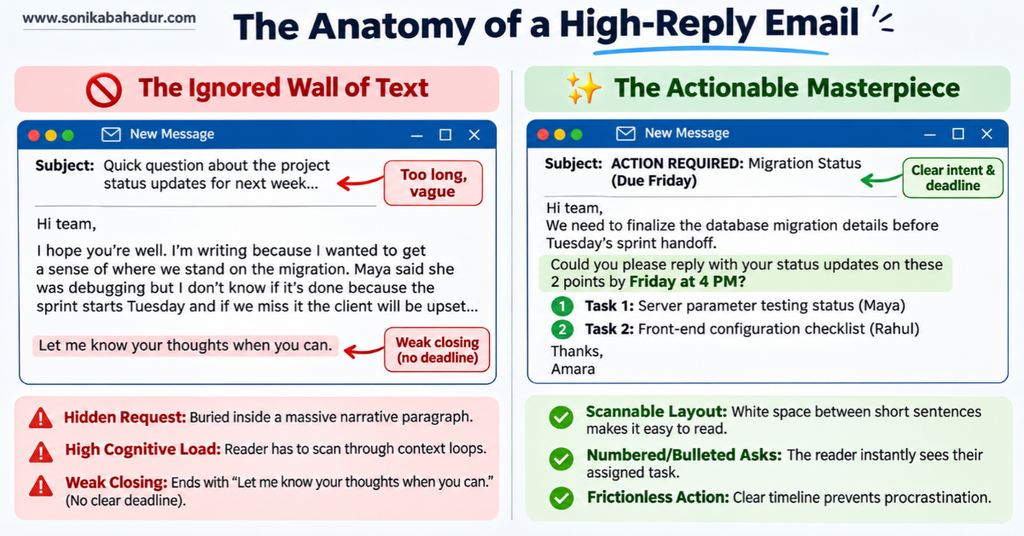
Writing a short email that gets results doesn’t require a master’s degree in literature. It just requires a predictable framework. Every high-converting professional email should follow a simple four-part structure:
- The Clear Subject Line: Tells the reader exactly what is inside before they even open it.
- The Context (1-2 sentences): Explains why you are writing right now.
- The Core Value/Data (Bullet points): Presents the facts cleanly.
- The Single Call to Action (1 sentence): Asks a direct, closed question so they can reply in under ten seconds.
Let’s look at how this works across real-world situations with practical examples you can copy and adapt today.
Part 3: Practical Examples & Real-World Rewrites
To understand how to trim the unnecessary parts, let’s look at three classic workplace scenarios. We will take a typical long, winding email and rewrite it into a punchy, high-trust message.
Scenario 1: Requesting an Approval or Sign-off
Imagine you need a manager or client to approve a design, a budget, or a document so you can move forward.
The Fluffy, Low-Response Version:
Subject: Updates regarding the upcoming project milestone and the things we need to finalize before next Tuesday
Hi Elena,
I hope you are having a productive week so far. I am writing to you because our team has been working really hard on the new user onboarding flow designs, and we have finally managed to finish the high-fidelity mockups. There were a few disagreements about where to place the login button, but we settled on the top right corner because it fits standard usability guidelines. We really need to get your feedback on this because the development sprint is scheduled to begin next week, and if we don’t get your approval on the final layout, the engineering team won’t be able to start coding on time, which might push our launch date back by at least two weeks. I have attached the link below. Please let me know what you think when you have a moment.
Thanks,
Rahul
Why this fails: It’s a wall of narrative. Elena has to read a story about team disagreements and launch delays just to find out she needs to click a link.
The Short, High-Trust Rewrite:
Subject: APPROVAL NEEDED: New Onboarding Designs (Due Friday)
Hi Elena,
The team has finalized the user onboarding mockups for the upcoming development sprint.
Could you please review the layouts and reply with your approval by Friday, Nov 13?
- Design Link: [Insert Link Here]
- Key Change: Moved login button to top right for better usability.
If this looks good, just reply with “Approved” and I will hand it off to the engineering team.
Best regards,
Rahul
Why this works: The subject line sets expectations immediately. The deadline is bolded. The action required from Elena takes less than a minute to complete.
Scenario 2: Giving a Technical Project Update
Tech professionals, developers, and analysts frequently make the mistake of over-explaining the process instead of focusing on the impact.
The Fluffy, Low-Response Version:
Subject: Quick update on the database migration issue that happened yesterday evening
Hi Kenji,
I wanted to drop you a quick note about what happened during the database migration last night. We started the process at 11 PM as planned, but around 11:45 PM we ran into a weird latency spike on the secondary server cluster. Maya and I spent about two hours debugging the indexing parameters because we thought that was causing the bottleneck, but it turned out to be an unexpected network configuration issue on the cloud host side. We managed to patch it by rolling back the temporary configurations and restarting the sync loops. Everything seems stable now, and the automated health checks are green, so you don’t need to worry, but I wanted to make sure you had all the background context in case someone asks about the brief downtime window.
Regards,
Mateo
Why this fails: Kenji opens this and panics because he sees words like “latency spike,” “downtime,” and “debugging.” He has to read the whole paragraph to find out that everything is actually fine.
The Short, High-Trust Rewrite:
Subject: RESOLVED: Database Migration Successful
Hi Kenji,
The database migration completed successfully last night and all systems are fully stable.
Here is a quick 30-second summary of the deployment:
- Current Status: 100% operational (All system health checks are green).
- Incident: Experienced a brief 15-minute latency spike at midnight due to a cloud hosting configuration issue.
- Fix: Maya and I patched the network settings and verified data integrity.
No action is required on your part. I just wanted to keep you informed.
Best,
Mateo
Why this works: The word “RESOLVED” in the subject line lowers the reader’s stress instantly. The bullet points break down the event clearly without confusing technical jargon.
Scenario 3: Asking for Information from a Busy Stakeholder
When you need answers to multiple questions, putting them in an open paragraph ensures the recipient will only answer the easiest question and ignore the rest.
The Fluffy, Low-Response Version:
Subject: Question about the client meeting next month and the presentation slides
Hi Chloe,
I hope you’re doing well. I’m starting to put together the deck for our upcoming strategy review session with the enterprise team from Munich, and I realized I don’t have the final Q3 revenue numbers for the European region yet. Do you know if those have been audited by finance yet, or should I just use the internal estimates we talked about last week? Also, do we know exactly who from their executive board will be attending the session, because I want to tailor the technical depth of the slides depending on whether their CTO is going to be in the room or if it’s just the procurement managers. Let me know what your thoughts are on this when you get a chance.
Thanks,
Amara
The Short, High-Trust Rewrite:
Subject: 2 Quick Questions: Munich Strategy Review Deck
Hi Chloe,
I am building the presentation deck for the upcoming Munich enterprise meeting and need two quick updates to finalize the slides:
- Q3 Revenue Numbers: Should I use audited finance numbers or our internal estimates?
- Attendee List: Do we know if their CTO is attending, or is it strictly the procurement team?
If you can drop your quick answers right below each question, I can finish the draft by this afternoon.
Thanks so much,
Amara
Why this works: Numbering your questions creates visual separation. Chloe can literally hit “Reply,” type her answers directly next to numbers 1 and 2, and hit send in ten seconds.
The Professional Email Toolkit: 50 Copy-Paste Workplace Scripts
Never waste 20 minutes overthinking how to phrase a difficult workplace email again. Get 50 proven, fill-in-the-blank email scripts designed to help you sound clear, polite, and confident in every professional situation.
Get Instant Access to All 50 Scripts → Ready-to-use digital toolkit • Just fill in the blanks and hit sendWhy Professionals Love This Toolkit
Skip the blank-screen stress and write polished, high-impact workplace emails in under 60 seconds.
Know how to be firm without sounding rude, and polite without sounding unsure or overly apologetic.
Every script comes with clear [bracketed placeholders] so you can customize and send immediately.
What’s Inside the 50 Workplace Scripts
Part 4: 5 Phrases to Delete from Your Inbox Immediately
One of the fastest ways to shorten your emails is to eliminate passive, defensive, or unnecessary filler words. Here are five incredibly common phrases that stretch your writing and how to replace them to sound more confident:
1. “I am writing to you because…”
- Why it’s fluff: The reader knows you are writing to them because they are currently reading your email.
- The Fix: Delete it entirely and state your point. Instead of “I am writing to ask for a status update,” use “Could you please share a quick status update on…?”
2. “Sorry for the delay / Sorry to bother you”
- Why it’s fluff: It sets a defensive, low-authority tone right from the opening sentence. Unless you missed a major deadline by a week, you don’t need to apologize for standard business timelines.
- The Fix: Swap it for appreciation. Use “Thank you for your patience while I finalized these details” or go straight into the context.
3. “Just checking in to see if…”
- Why it’s fluff: The word “just” minimizes your presence and makes your request sound unimportant.
- The Fix: Be direct and clear. Use “Following up on our discussion regarding…” or “Do you have an update on…?”
4. “Please let me know what your thoughts are on this when you have a moment.”
- Why it’s fluff: This is an open-ended statement that forces the recipient to think deeply and write an essay back to you. It leads to procrastination.
- The Fix: Give them choices. Use “Does Option A or Option B work better for your team?“ or “Please reply with your approval if this looks correct.”
5. “I hope this email finds you well.”
- Why it’s fluff: It is a generic, robotic phrase that almost everyone skims past without reading.
- The Fix: If you genuinely know the person well, use a specific, human line like “Hope you enjoyed your weekend hiking trip!“ If you don’t know them well, skip the pleasantries entirely and dive right into a respectful, clear message.
Frequently Asked Questions
1. Is it rude to send a very short email?
No, it is not rude as long as your tone is polite and professional. True politeness in a business setting means protecting the other person’s time. A clean, three-line email that uses standard professional greetings is far more respectful than a polite, winding fifty-line message that wastes five minutes of their day.
2. How do I write a short email if I have a massive amount of technical context to share?
Do not paste the raw data or detailed history into the main body of the email. Instead, use the email to state your core point and the required action item, then drop the detailed data into an organized appendix at the bottom of the message, or link to a shared tracking document. Use a transition line like: “Summary details below; full technical specifications attached at the bottom of this message for reference.”
3. What should I do if a colleague still ignores my short email?
If you used a clear subject line, bolded the deadline, kept it under five sentences, and still received no response, the problem isn’t your formatting—it’s their inbox volume. Wait 48 hours, reply to your original message thread, and add a single-sentence polite nudge: “Hi Sarah, following up on this—do you have a quick update regarding the design approval?” If it is an urgent blocker, transition the conversation to a quick chat channel or phone call instead.
Conclusion: The 30-Second Rule
Before you hit send on your next email, take exactly thirty seconds to do a final pass. Look at your draft and ask yourself these two questions:
- Can I turn this paragraph into three clean bullet points?
- Is my final question completely clear, or did I hide it inside a sentence?
When you respect your colleagues’ time by sending short, crisp, highly structured messages, they will repay you by replying faster, respecting your clarity, and trusting you with higher-level responsibilities. Shorter emails don’t just clear out an inbox—they build your reputation as an efficient, reliable professional.
Share your thoughts:
Drop a long or complicated email you’re struggling to shorten into the comment section below, and I will personally help you rewrite it into a short, punchy, high-conversion masterpiece!
Also share, if your have any query or concern. Don’t forget to subscribe for more such useful content.
I create content to make English learning simple and practical. If you find it helpful, consider supporting me. Your contribution helps me improve my skills and bring better content for you.